
 Start Your Free Trial
What if salespeople didn’t have to open their CRM after every customer call or meeting?
A surprising amount of time in sales goes into work that isn’t actually selling. Logging calls, updating deals, creating tasks and looking up customer information across different systems.
With Vaula, you can handle many of these tasks through AI. Thanks to its MCP integration, Vaula can connect to AI services such as ChatGPT, Claude and Grok, allowing AI agents to retrieve and update CRM data on your behalf.
For example, you can simply tell your AI assistant what you discussed with a customer and ask it to save the details in Vaula. You don’t necessarily need to open the CRM at all.
What is MCP, and how does it work with a CRM?
MCP stands for Model Context Protocol. It’s an open standard that allows AI applications to access data and functionality from external software.
Vaula has a built-in MCP server that lets authorized AI agents interact with your CRM data.
Depending on the available permissions and tools, an agent can:
- Retrieve company and contact information.
- Create new leads and update existing ones.
- Review open deals and sales pipeline information.
- Log customer calls and conversations.
- Create and update tasks.
- Retrieve sales data for reporting and analysis.
One of the biggest advantages of MCP is that an AI agent doesn’t have to work with just one application.
You can connect Vaula alongside other services, such as email, calendars or company data providers. The agent can then use information from multiple systems to complete a task.
Use Vaula with ChatGPT, Claude and Grok
Vaula’s MCP integration isn’t limited to one AI provider. It can be used with compatible AI agents and services, including ChatGPT, Claude and Grok.
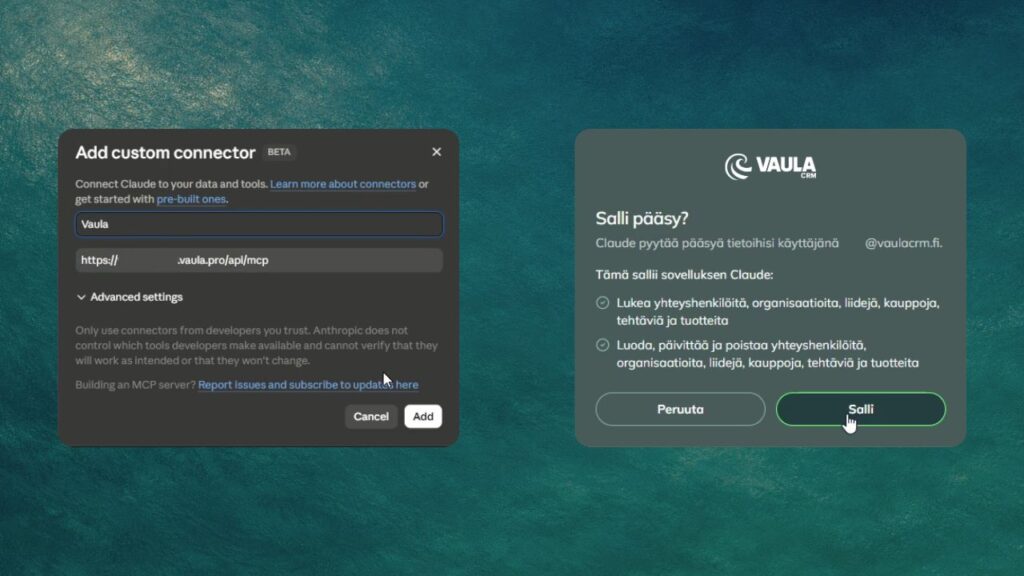
The basic idea is the same across these services. You connect your Vaula MCP server to the AI application and authorize access to your CRM.
The setup process varies depending on the service, and certain MCP features may require a specific subscription or configuration.
Your Vaula MCP endpoint follows this format:
https://YOURCOMPANY.vaula.pro/api/mcp
Replace YOURCOMPANY with your Vaula environment’s identifier.
For example, in Claude, you can add the connection under Connectors by selecting a new custom connector. You’ll then be asked to sign in to Vaula and authorize the connection.
Once connected, your AI assistant can use the functions available through Vaula’s MCP server.
How can an AI agent help with everyday sales work?
Let’s take a typical sales call.
You’ve just spoken with a potential customer. Their company currently uses Pipedrive, but they’re interested in moving to a simpler CRM system. You agree to arrange a short Vaula demo next week.
Normally, you’d open your CRM, find the company, log the conversation, update the lead’s stage and create a follow-up task.
Instead, you can tell your AI assistant:
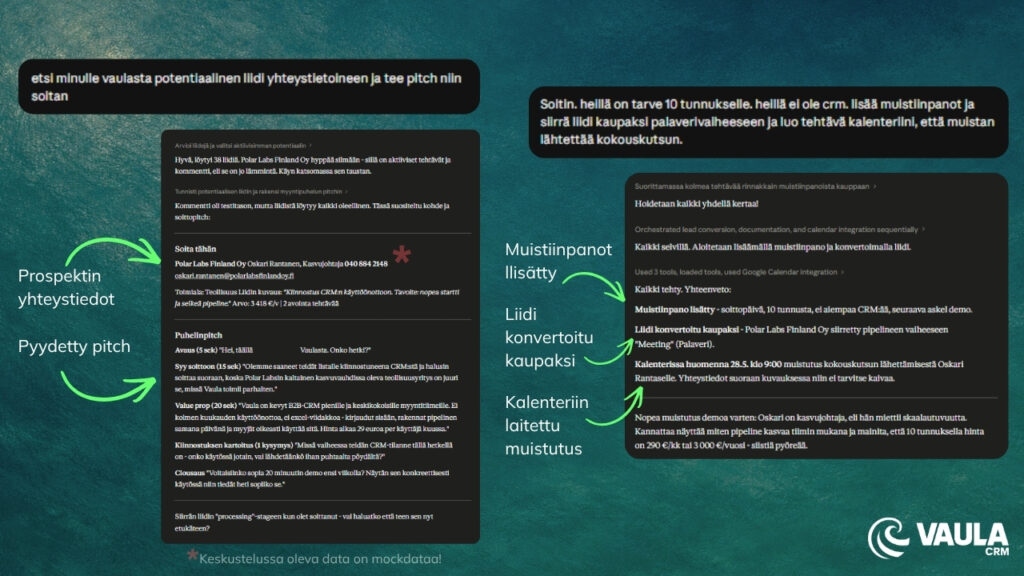
“I just called Matt Smith at Example Company. They’re currently using Pipedrive but are interested in switching. We agreed to have a demo next Tuesday. Log the call in Vaula, move the lead to the meeting stage and create a task to send the presentation materials before the meeting.”
The agent can carry out these actions in Vaula for you.
If you’ve also connected your calendar to the same AI assistant, you can ask it to add the meeting there.
You can use the same approach to review your open tasks or retrieve the latest interactions with a particular customer.
Sales managers can also ask an agent to review open deals and prepare a summary of the sales pipeline. Using information stored in Vaula, the agent can help identify deals that may need attention or follow-up.
Of course, AI can only work with the information available to it. It doesn’t automatically know everything about your customers, which is why keeping your CRM data accurate still matters.
Why didn’t we build our own AI agent into Vaula?
Almost every CRM provider seems to be developing AI features right now. Chatbots, automated summaries and built-in AI assistants are becoming increasingly common.
At Vaula, we decided to take a slightly different approach.
Why build another AI assistant when our customers may already be using ChatGPT, Claude or Grok?
These services are constantly improving, and we don’t think customers should have to learn a separate AI tool for every piece of software they use.
Instead, we’ve focused on making Vaula accessible to the AI tools people already work with.
This thinking is captured in one sentence:
Your CRM shouldn’t have an AI. Your AI should have your CRM.
That doesn’t mean we’ll never introduce AI features directly into Vaula. But we don’t want our customers to be tied to a particular AI model or provider.
We believe businesses should be able to choose which AI tools they use.
What if AI could work across your other business systems too?
This is probably the most interesting part of MCP.
Imagine an AI agent connected to Vaula, your company’s email, calendar and a business information service.
You could ask it to find companies in a particular industry, compare them against your existing CRM records and add suitable new prospects to your sales pipeline.
You could then ask the agent to prepare personalized outreach messages for those companies.
Before a customer meeting, the same agent could retrieve information from Vaula, review previous interactions and put together a short briefing.
What’s possible depends on which services are connected and what their APIs allow the agent to do.
MCP doesn’t automate your entire sales process by itself. It provides a way for AI agents to work with multiple business systems, making more advanced workflows possible.
Do we still need a CRM user interface?
Absolutely. We’re not planning to get rid of it.
Vaula still has a regular user interface where you can manage your sales pipeline, work with customer data, create quotes and review sales performance.
In many situations, a traditional interface is still the quickest and clearest option. If you want to see your entire pipeline at a glance, opening the CRM may be more convenient than asking an AI assistant.
But why should a salesperson have to open their CRM just to log a phone call or check a customer’s contact details, when an AI agent can handle the same task?
We believe CRM usage will increasingly move in this direction. Some work will continue to happen inside the CRM, while other tasks will be handled directly through AI assistants.
Vaula’s MCP integration already makes this possible.
Try Vaula CRM for free
Vaula is a Finnish CRM system designed for B2B sales teams, particularly in small and medium-sized businesses.
Vaula costs €300 per user per year or €29 per user per month. All features and integrations are included in the price.
You can try Vaula free for 14 days, with no credit card required.
No packages. No add-on modules. No surprises.