Category: Artikkelit

  • Vaula MCP – Setup and User Guide

    Vaula MCP – Setup and User Guide

    Did you know you can use Vaula directly through an AI assistant?

    For example, you can ask AI to show your open deals, find a customer’s contact details or log a phone call in Vaula. You don’t need to open your CRM for every task.

    No programming skills are required to set up the connection, as long as your AI service supports custom MCP connections.


    Before you get started

    You’ll need a Vaula user account and an AI service that allows you to add custom connections.

    You’ll also need your company’s Vaula MCP address. It follows this format:

    https://XXXXX.vaula.pro/api/mcp

    Replace XXXXX with your company’s Vaula identifier. For example: https://YOURCOMPANY.vaula.pro/api/mcp

    Copy your MCP address. You’ll need it in the next step.

    Choose your AI service below and follow the instructions.


    Connect Vaula to Claude

    1. Open Claude and sign in.
    2. Go to Customize → Connectors.
    3. Click Add, select Custom, then Web.
    4. Enter Vaula CRM as the connection name.
    5. Paste your company’s Vaula MCP address.
    6. Click Continue and follow the sign-in instructions.
    7. Sign in to Vaula and authorize the connection.
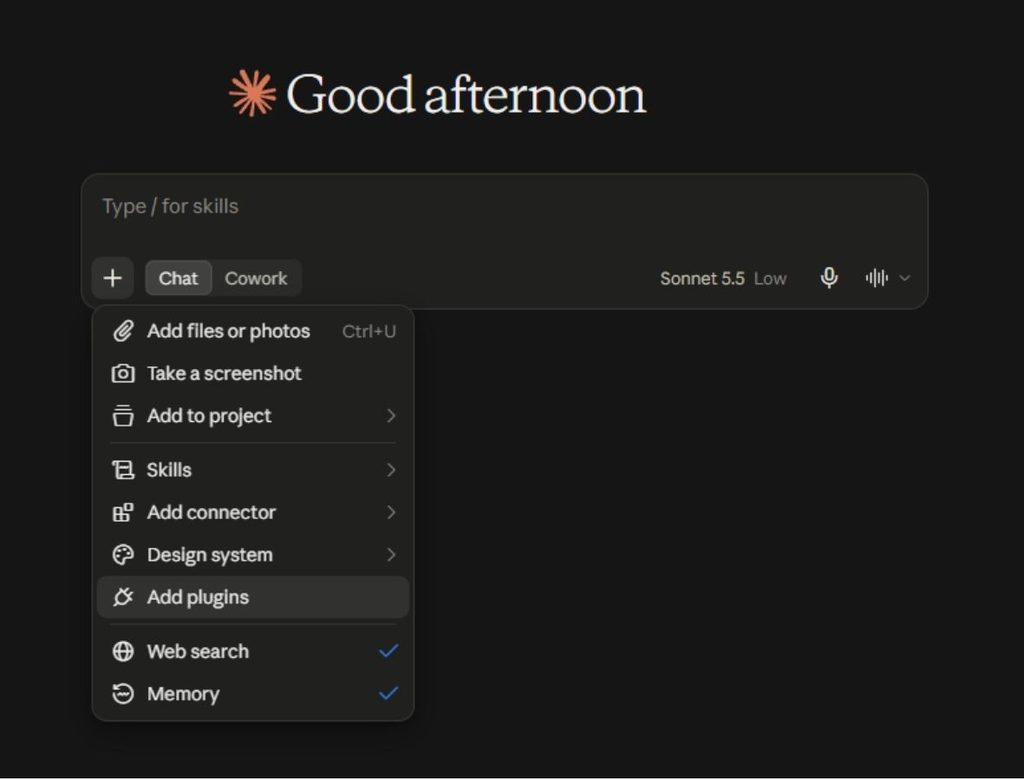
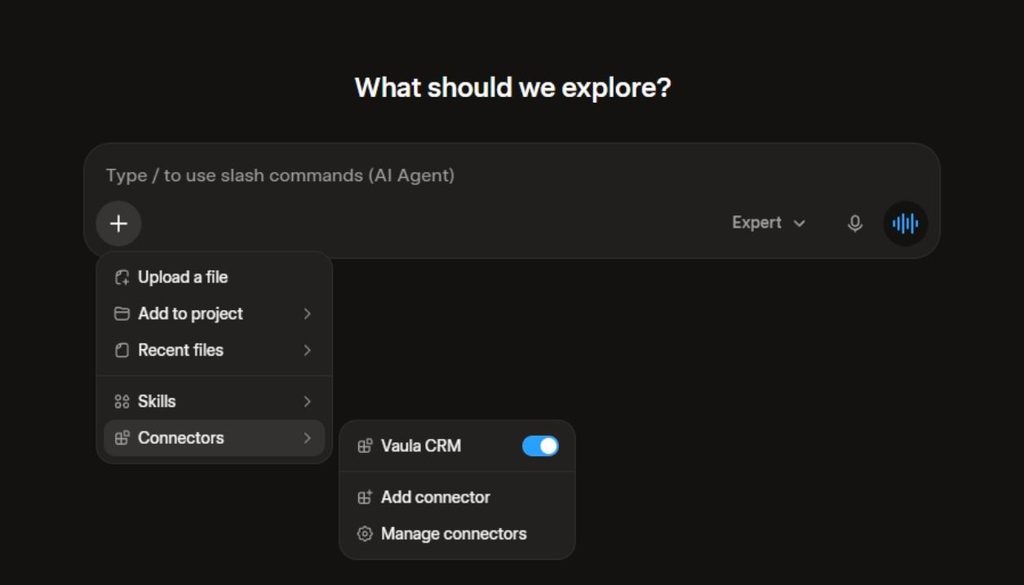
    8. Open a Claude conversation and check the Connectors section in the + menu to make sure Vaula is enabled.

    You’re all set! You can now ask Claude to retrieve information from Vaula.

    Claude also supports custom MCP connections on its free plan, although some features and connection limits may vary depending on your subscription.

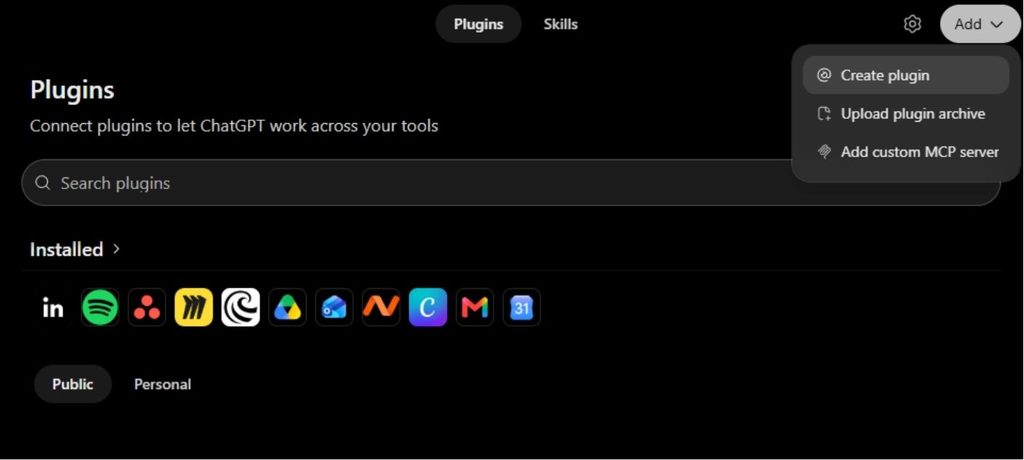
    Connect Vaula to ChatGPT

    The availability of MCP connections in ChatGPT depends on your subscription and your organization’s settings.

    1. Open ChatGPT.
    2. Go to Settings → Apps.
    3. If Developer mode is available, enable it. On a business account, this may require approval from your administrator.
    4. Select Create app, or the equivalent option for creating a new app.
    5. Enter Vaula CRM as the name.
    6. Add your company’s Vaula MCP address.
    7. Select the required authentication method and sign in to Vaula.
    8. Check that ChatGPT detects Vaula’s tools and complete the setup.
    9. Enable Vaula in your ChatGPT conversation.

    Note: Not all ChatGPT plans support custom MCP connections. Creating and modifying CRM records may require a supported business or organization plan. If you can’t find the settings mentioned above, check which features are included in your subscription.

    Connect Vaula to Grok

    1. Open Grok Connectors.
    2. Select New Connector.
    3. Select Custom.
    4. Enter Vaula CRM as the name.
    5. Paste your company’s Vaula MCP address.
    6. Sign in to Vaula and authorize the connection.
    7. Make sure Vaula’s tools are visible in Grok.

    You’re all set! You can now try using Vaula in a Grok conversation.

    If you’re using Grok through a company-managed account, your administrator may need to allow custom connections first.

    Connect Vaula to Microsoft Copilot

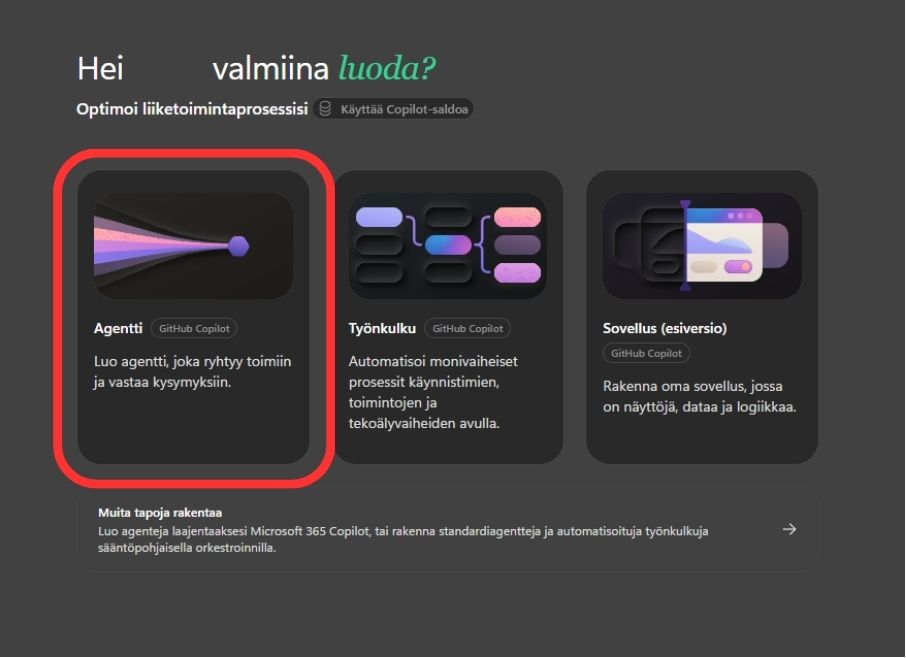
    MConnecting Vaula to Microsoft Copilot is done through Copilot Studio. This option is particularly useful for businesses building their own AI agents.

    1. Open Copilot Studio.
    2. Create a new agent or open an existing one.
    3. Go to Tools.
    4. Select Add a tool → New tool → Model Context Protocol.
    5. Enter Vaula CRM as the connection name.
    6. Add a description, such as Retrieves and updates customer, deal and task information in Vaula CRM.
    7. Paste your company’s Vaula MCP address.
    8. Select OAuth 2.0 as the authentication method and Dynamic discovery, if available.
    9. Create the connection and sign in to Vaula.
    10. Add Vaula’s tools to your agent and test the connection.

    Setting up Copilot Studio may require assistance from your company’s IT administrator. The connection also depends on compatibility between Microsoft’s and Vaula’s authentication settings.

    Test your Vaula connection

    Once you’ve connected Vaula to your AI service, start with a simple request.

    Try this first:

    “Show me my open tasks in Vaula.”

    If the AI assistant retrieves the correct tasks, the connection is working for reading information.

    You can also try these requests:

    Customer information

    “Find Example Company in Vaula and show me its contacts.”

    Sales pipeline

    “Show me all my open deals and their current pipeline stages.”

    Creating a new lead

    “Create a new lead for Example Company in Vaula.”

    Logging a phone call

    “Log a call in Vaula saying that I spoke with Matt Smith today and we agreed to schedule a meeting next week.”

    Creating and updating records requires your AI service to support these actions.


    What if the connection doesn’t work?

    The AI assistant can’t find Vaula

    • Make sure the connection has been added and enabled in the conversation you’re using.

    Sign-in fails

    • Check that your MCP address is correct, then try signing in again.

    The AI assistant can read data but can’t make changes

    • Check your AI service’s subscription and permissions. Not all services support editing CRM data on every plan.

    A customer or deal can’t be found

    • Open Vaula and check that the record exists and that you have permission to access it.

    Is the connection secure?

    Vaula’s MCP connection uses individual user authentication. You don’t need to give your Vaula password directly to the AI assistant.

    The connection operates according to the permissions available to your user account. However, remember that your AI service processes the information shared with it according to its own privacy terms and policies.

    For business use, make sure your organization has approved the AI service you’re connecting to Vaula.


    Vaula API and MCP documentation

    Want to learn more about Vaula’s APIs and the technical implementation of MCP?

    Our official developer documentation provides more information about the available APIs, supported functionality and building integrations with Vaula.

    Developer documentation: https://developers.vaula.pro/api/docs


    Need help?

    If you’re having trouble connecting Vaula to your AI service, contact Vaula Support.

    Let us know which AI service you’re using, where the setup fails and what error message you’re seeing. If possible, include the error message in your email.
  • Buying a CRM – what does a sales team actually need in 2026?

    Buying a CRM usually goes wrong for the same reason. A company buys a system that is marketed as the answer to everything. A few months later the sales team never opens it, Excel is still in use, and customer information lives in inboxes, sticky notes and one person’s head.

    There are more features available now than ever before, but the actual need in sales has not grown at the same pace. The need is still the same: know who you have talked to, what was promised, where the deal stands and what needs to happen next.

    This article is written for anyone about to buy a CRM who wants to know what to demand from it.

    When does a CRM become relevant?

    Excel works surprisingly far. A salesperson who knows their own customers manages fine with a spreadsheet, a calendar and a good memory. Excel is not the problem in itself. The problem starts the moment there are several people involved and the work starts to need some automation.

    A CRM becomes relevant when any of these starts repeating:

    More leads come in than anyone has time to handle. Some go cold, not because the product is wrong, but because nobody remembered whose turn it was to call.

    More people join. The new salesperson cannot see the previous conversation. The summer temp does not know what was promised to the customer. One person is the only one who can read the spreadsheet correctly.

    Something has been done for the customer, but nobody is sure what. The proposal is in some folder, the meeting notes are in Teams and the next step is in one person’s calendar.

    Management wants to see the state of sales without interviewing every salesperson separately. Excel gives you a list. It does not give you a picture of what is open, what is stuck and what is already lost.

    In these situations a CRM is not a systems project. It is a way of moving customer information out of individual people’s memories into a place the whole team uses.

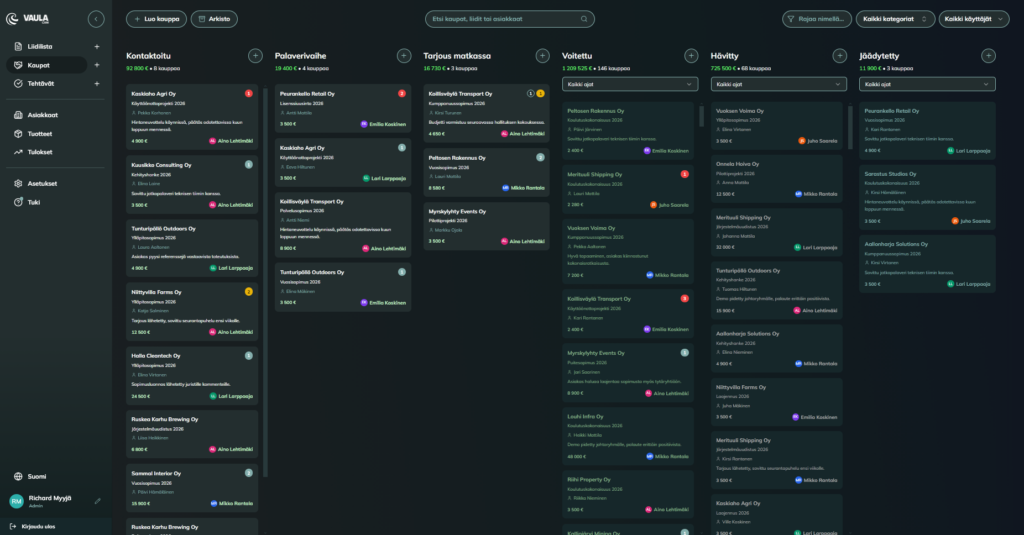
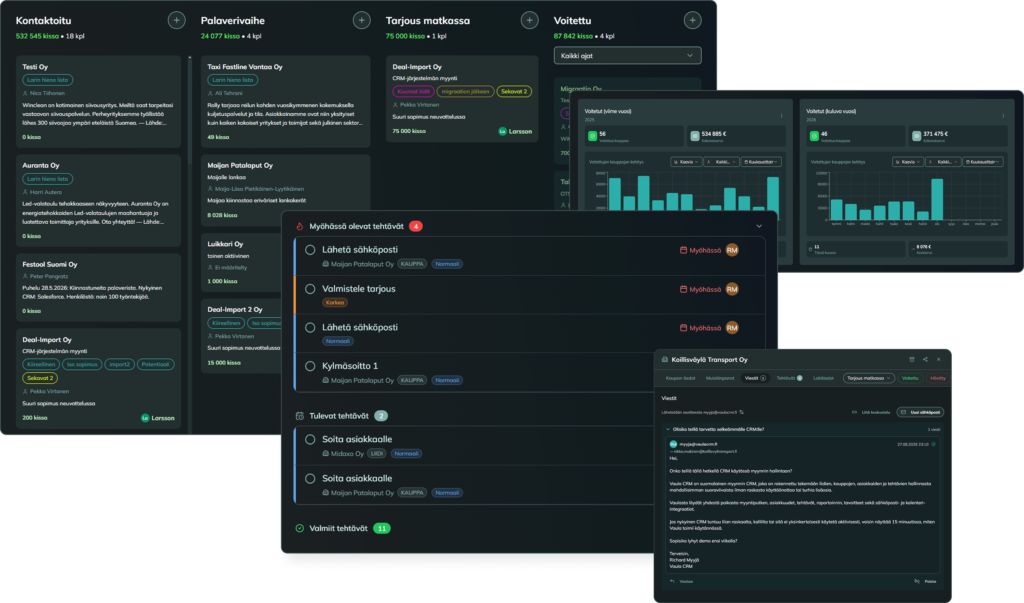
    Vaula CRM:n myyntiputki ja myynninhallinnan näkymä

    Why Excel stops being enough

    Excel is easy to criticise, but it has one significant advantage. It is fast. That is why Excel is genuinely a better solution for many teams than a CRM nobody opens.

    The limits show up later. Excel does not remind you that Mike was supposed to be called two weeks ago. Contact history does not accumulate systematically. Keeping a shared picture of the situation requires discipline, and the more people and customers there are, the harder it gets.

    Excel scales for storing information. It does not scale for running a sales process.

    Why a heavy CRM does not automatically solve the problem

    A CRM can contain an enormous number of features and still fail at its most important job, which is capturing information.

    If every contact requires filling in several fields, choosing the right classifications and moving through multiple views, the threshold for recording anything goes up. Under time pressure the result is that the more precisely the system demands information, the less ends up being entered.

    That creates a contradiction. Management looks at the CRM and sees an empty pipeline where no selling appears to be happening. The salesperson sells all day but feels the system gives no help with the work and is just work on top of work.

    Reporting can also be technically perfect, but if the underlying data was incomplete to begin with, the report only tells you what somebody remembered to type in.

    What do you actually need from a CRM?

    In sales work the list is short. If these basics work well, the system carries. If these are heavy, no add-on module will save it.

    Accounts and contacts. One view should show the company, the people, the latest conversations, open tasks and related deals. If answering “what has happened with this customer” requires opening three views, the system is already too slow for daily work.

    Sales pipeline. The pipeline exists to show where deals are and where they stop moving. A good starting point is that a deal is in progress, won or lost. There is no point building complicated stages for a simple thing.

    Tasks and reminders. Deals do not fall through because of missing features. They fall through because the next contact never happens. A system that notices a customer has gone too long without contact is worth more than ten automations.

    Finding information. Search and a clear structure matter more than another dashboard. A salesperson opens the CRM in a hurry. If the customer does not come up in ten seconds, the CRM stays closed next time.

    Reporting. Very few teams have an analytics department chewing everything into shape for them. The system needs to answer quickly: how much value is in the pipeline, where deals are stalling and where new leads come from.

    What sales does not need

    Systems are usually compared on features. The sales team and its daily reality decide whether the system actually gets used.

    There is no sense in buying a hundred features when most of them stay buried in settings. You need the minimum that gets the organisation learning to use the system. Once it is in use and the processes are in order, then it is time to take sales to the next level.

    Months-long implementation projects do not belong in modern systems either. If you have to hire an army of consultants to get a sales pipeline running, it is worth sleeping on it and asking what is actually being built here and what the whole point of the exercise was.

    ERP, marketing automation and enterprise platforms are the right tools in the right situation. They are not the default choice for a team that wants to know who was called yesterday or where one particular deal stands right now.

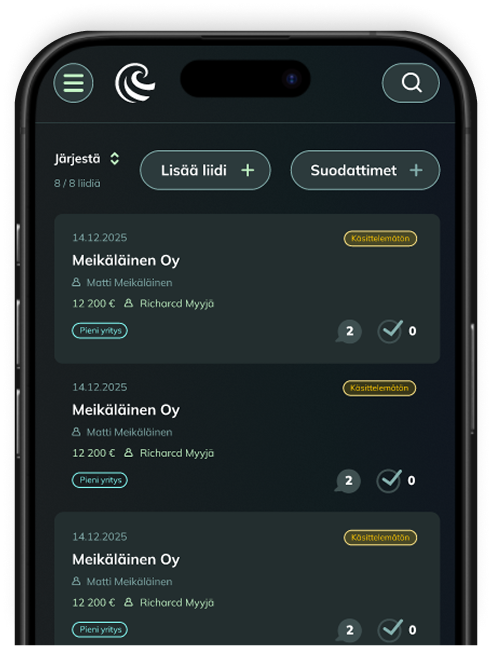
    Vaula CRM mobile ui cropped

    Ease of use is a core feature, not a nice extra

    Even the best CRM is useless if the sales team does not use it. This is the most common reason a CRM purchase fails.

    Adoption does not fail because the pipeline has too few stages. It fails because entering information feels like extra work.

    The Finnish Ski Association was looking for a lighter and more cost-effective solution than traditional CRM systems to support its partnership sales. Sales Manager Herkko Mali described the outcome like this:

    “Vaula feels like it was built for salespeople. It is light and clear to use.”

    A good test for any CRM: does the system support people, or does it turn into work that people have to serve?ai muuttuuko se itse työksi, jota ihmisten pitää palvella?

    What does a CRM really cost?

    The licence is only part of the price. Add implementation, integrations, training and the working hours the sales team spends fighting with the system.

    A typical trap is a cheap base package that does not include what sales actually needs. The second trap is project size. The system gets built with the sales organisation and administration for months on end, and eventually there is a price tag in the tens of thousands on the table before anyone knows whether this even works here. The third trap is dependency: the data is in the system, but getting it out requires a new project and a new invoice.

    At Vaula we have been involved in plenty of those projects, which is why we built a price that includes the whole CRM. No packages, no separate implementation fees and no other unnecessary billing. The annual licence is 300 euros per person and the monthly licence is 29 euros per person. The pricing is transparent and predictable. Getting started takes under an hour and you do not have to buy coffee for a single consultant (unless you feel like buying us one).

    What about the AI revolution everyone is posting about?

    AI is usually sold alongside a CRM with the same logic as every other feature: more gadgets and more recurring monthly fees.

    In reality AI should reduce costs by removing work that was never the salesperson’s job in the first place.

    Vaula supports MCP, the Model Context Protocol, which allows an AI assistant to connect directly to the data and functions in the CRM. You can ask the assistant what was agreed with a customer or which deals have been left without a next task, and it can also record information on your behalf. In practice this means the salesperson does not even need to log into the CRM and can handle everything through the assistant.

    It is this simple. The salesperson opens ChatGPT and asks what needs doing today. The assistant answers that there are x tasks and suggests starting with task Y. The salesperson asks for the contact details and a briefing, and the assistant pulls the information from the CRM. The salesperson makes the call, then tells the assistant how it went, and the assistant writes it into the CRM. The next time that customer is called, the CRM remembers what was discussed and agreed, and helps identify the next steps toward closing.

    AI does not replace sales work. It replaces the data entry that has traditionally made salespeople neglect the CRM.

    And this is included in the Vaula licence at no extra charge.

    Read more: CRM without a user interface – Vaula and MCP →

    Who Vaula is for and who it is not for

    Vaula is at its best for organisations with 2 to 50 salespeople. It fits situations where Excel has become too thin or a previous CRM was left unused.

    Vaula is not the right choice if you are looking for an ERP, a marketing automation platform, or a system that gets customised for months across several departments.

    A quick test. If the problem is “we do not know what was last done for this customer”, a light sales CRM is the right direction. If the problem is “we need to connect marketing, finance and inventory into one platform”, the direction is a different one.

    Our goal is to make selling more efficient, and that only happens by letting go of unnecessary manual processes. Vaula is of course worth connecting to your ERP and invoicing systems so that information moves between systems automatically. That works through the Vaula API.

    How to get started

    List what you need in order to get sales moving. Is it lead management, clear ownership, a pipeline, reporting or proposals. And think about what other choices you are willing to make in daily work.

    Do you hold weekly meetings where you review the coming week’s tasks and targets from the CRM? Do you have active follow-up where the sales lead goes through what each person is doing? Do you have a plan for keeping the CRM data relevant and up to date? How does your model hold up if revenue and headcount double?

    These are worth thinking through before buying a single licence. With a good partner you should be able to talk these through as well, and many vendors have seen a wide range of situations. So ask.

    It is worth remembering that the real cost of a CRM is not the licence. It is the lost deal and the knowledge that walks out of the building with a salesperson.

    A CRM has succeeded when the salesperson knows the next step, the team sees the same picture and the customer does not have to explain their situation all over again.

    If you want to see what Vaula does, book a demo. We will walk you through it and work out how we could help your team.

  • CRM without a user interface – Vaula and MCP

    What if salespeople didn’t have to open their CRM after every customer call or meeting?

    A surprising amount of time in sales goes into work that isn’t actually selling. Logging calls, updating deals, creating tasks and looking up customer information across different systems.

    With Vaula, you can handle many of these tasks through AI. Thanks to its MCP integration, Vaula can connect to AI services such as ChatGPT, Claude and Grok, allowing AI agents to retrieve and update CRM data on your behalf.

    For example, you can simply tell your AI assistant what you discussed with a customer and ask it to save the details in Vaula. You don’t necessarily need to open the CRM at all.


    What is MCP, and how does it work with a CRM?

    MCP stands for Model Context Protocol. It’s an open standard that allows AI applications to access data and functionality from external software.

    Vaula has a built-in MCP server that lets authorized AI agents interact with your CRM data.

    Depending on the available permissions and tools, an agent can:

    • Retrieve company and contact information.
    • Create new leads and update existing ones.
    • Review open deals and sales pipeline information.
    • Log customer calls and conversations.
    • Create and update tasks.
    • Retrieve sales data for reporting and analysis.

    One of the biggest advantages of MCP is that an AI agent doesn’t have to work with just one application.

    You can connect Vaula alongside other services, such as email, calendars or company data providers. The agent can then use information from multiple systems to complete a task.


    Use Vaula with ChatGPT, Claude and Grok

    Vaula’s MCP integration isn’t limited to one AI provider. It can be used with compatible AI agents and services, including ChatGPT, Claude and Grok.

    The basic idea is the same across these services. You connect your Vaula MCP server to the AI application and authorize access to your CRM.

    The setup process varies depending on the service, and certain MCP features may require a specific subscription or configuration.

    Your Vaula MCP endpoint follows this format:

    https://YOURCOMPANY.vaula.pro/api/mcp

    Replace YOURCOMPANY with your Vaula environment’s identifier.

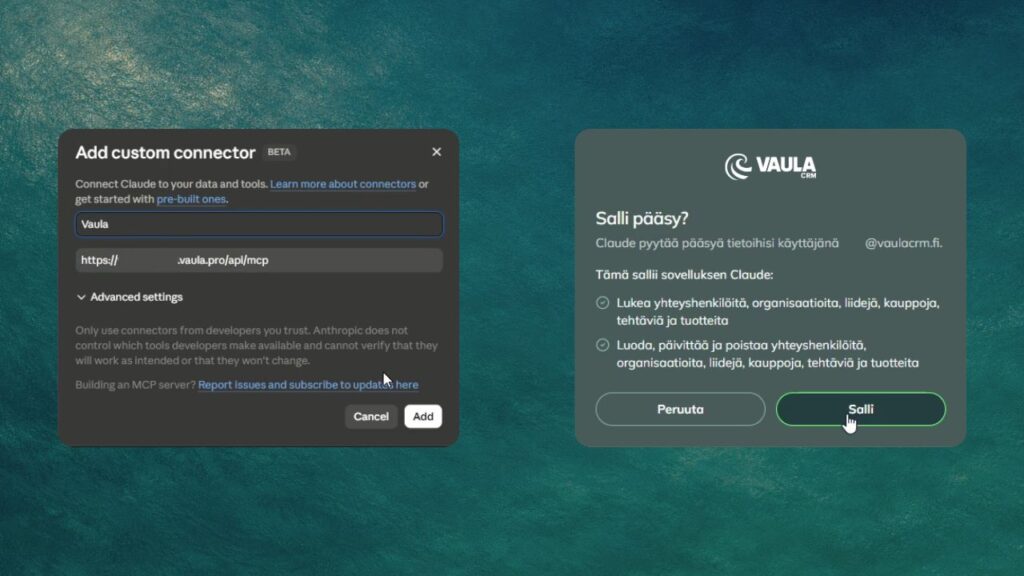
    For example, in Claude, you can add the connection under Connectors by selecting a new custom connector. You’ll then be asked to sign in to Vaula and authorize the connection.

    Once connected, your AI assistant can use the functions available through Vaula’s MCP server.

    Connecting Vaula CRM to Claude via MCP

    How can an AI agent help with everyday sales work?

    Let’s take a typical sales call.

    You’ve just spoken with a potential customer. Their company currently uses Pipedrive, but they’re interested in moving to a simpler CRM system. You agree to arrange a short Vaula demo next week.

    Normally, you’d open your CRM, find the company, log the conversation, update the lead’s stage and create a follow-up task.

    Instead, you can tell your AI assistant:

    “I just called Matt Smith at Example Company. They’re currently using Pipedrive but are interested in switching. We agreed to have a demo next Tuesday. Log the call in Vaula, move the lead to the meeting stage and create a task to send the presentation materials before the meeting.”

    The agent can carry out these actions in Vaula for you.

    If you’ve also connected your calendar to the same AI assistant, you can ask it to add the meeting there.

    You can use the same approach to review your open tasks or retrieve the latest interactions with a particular customer.

    Sales managers can also ask an agent to review open deals and prepare a summary of the sales pipeline. Using information stored in Vaula, the agent can help identify deals that may need attention or follow-up.

    Of course, AI can only work with the information available to it. It doesn’t automatically know everything about your customers, which is why keeping your CRM data accurate still matters.

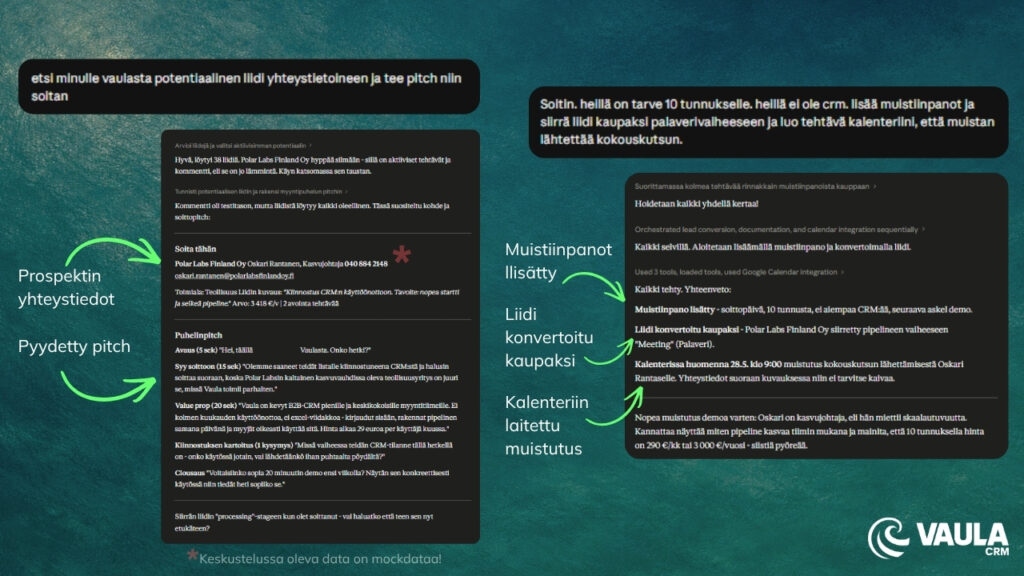
    Managing Vaula CRM sales tasks with Claude via MCP

    Why didn’t we build our own AI agent into Vaula?

    Almost every CRM provider seems to be developing AI features right now. Chatbots, automated summaries and built-in AI assistants are becoming increasingly common.

    At Vaula, we decided to take a slightly different approach.

    Why build another AI assistant when our customers may already be using ChatGPT, Claude or Grok?

    These services are constantly improving, and we don’t think customers should have to learn a separate AI tool for every piece of software they use.

    Instead, we’ve focused on making Vaula accessible to the AI tools people already work with.

    This thinking is captured in one sentence:

    Your CRM shouldn’t have an AI. Your AI should have your CRM.

    That doesn’t mean we’ll never introduce AI features directly into Vaula. But we don’t want our customers to be tied to a particular AI model or provider.

    We believe businesses should be able to choose which AI tools they use.


    What if AI could work across your other business systems too?

    This is probably the most interesting part of MCP.

    Imagine an AI agent connected to Vaula, your company’s email, calendar and a business information service.

    You could ask it to find companies in a particular industry, compare them against your existing CRM records and add suitable new prospects to your sales pipeline.

    You could then ask the agent to prepare personalized outreach messages for those companies.

    Before a customer meeting, the same agent could retrieve information from Vaula, review previous interactions and put together a short briefing.

    What’s possible depends on which services are connected and what their APIs allow the agent to do.

    MCP doesn’t automate your entire sales process by itself. It provides a way for AI agents to work with multiple business systems, making more advanced workflows possible.


    Do we still need a CRM user interface?

    Absolutely. We’re not planning to get rid of it.

    Vaula still has a regular user interface where you can manage your sales pipeline, work with customer data, create quotes and review sales performance.

    In many situations, a traditional interface is still the quickest and clearest option. If you want to see your entire pipeline at a glance, opening the CRM may be more convenient than asking an AI assistant.

    But why should a salesperson have to open their CRM just to log a phone call or check a customer’s contact details, when an AI agent can handle the same task?

    We believe CRM usage will increasingly move in this direction. Some work will continue to happen inside the CRM, while other tasks will be handled directly through AI assistants.

    Vaula’s MCP integration already makes this possible.


    Try Vaula CRM for free

    Vaula is a Finnish CRM system designed for B2B sales teams, particularly in small and medium-sized businesses.

    Vaula costs €300 per user per year or €29 per user per month. All features and integrations are included in the price.

    You can try Vaula free for 14 days, with no credit card required.

    Start your free trial

    No packages. No add-on modules. No surprises.